


Follow the instructions below to create an account on NYTimes.com as UNCW student/staff/faculty. Once you create an account you will be able to log in and access all NYTimes.com content from any computer and the NY Times mobile app. These accounts must be revalidated every 4 years for faculty and staff. Student academic passes are valid until December 31st of the graduation year selected.
Please contact us if you need assistance.
NYTimes.com contains most of the articles that appear in the printed New York Times paper, as well as a wealth of blogs, interactive features, videos and other web-only content.
Activation for new NYT users:
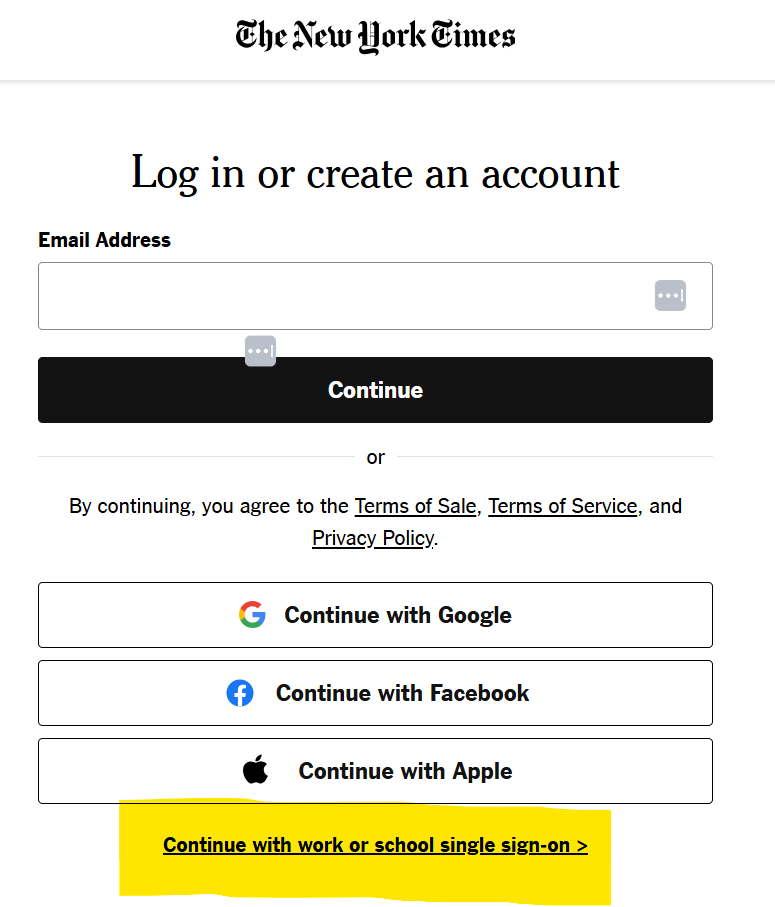
Click login on nytimes.com and immediately scroll down and select "Continue with work or school single sign-on" at the bottom of the login page.
Activation for existing NYT users:
From a web browser, log in to your nytimes.com via your current login method (eg, email/password). Then go to Account>Email and settings > Click "Connect" next to Work or School.
Logging in for returning SSO users:
Subscribers can to to nytimes.com, click Login, and immediately scroll down and click, "Continue with work or school single sign-on" at the bottom of the login page.
IMPORTANT: SSO isn’t available on the NYT mobile app yet. Once subscribers authenticate once via SSO (on the web) they can download the mobile app and just login with the same credentials.
Please contact us if you need assistance.